
AutoStandByPro
Free forever · No trial · No license key
Stop your PC sleeping
only when it actually matters
AutoStandByPro watches for the things that should keep your computer awake — Plex streaming, downloads, backups — and lets it sleep the rest of the time.
Latest version: 3.0.0 · Windows 10 and 11
Every way to decide "stay awake"
Four trigger categories, mixed and matched into rules that fit how you actually use your PC.
👤
User
No activity, mouse or keyboard idle, or a specific process running
🖥
Computer
CPU, disk & network thresholds, display state, services, reachable machines
🕑
Time-Based
A specific date, after a set time of day, or a recurring schedule
PLUS
⚡
Advanced
HTTP checks, power requests, and day/time profile scheduling
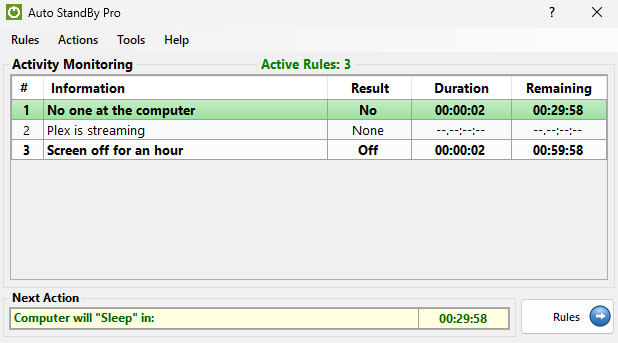
Every rule, in one place
No hidden config files. Build a rule, see it live, and know exactly why your PC is awake or asleep.
✓
Free core triggers, forever
✓
No scripts or scheduled tasks to babysit
✓
Runs quietly in the background
PLUS
Want the advanced triggers too?
HTTP checks, power requests, day/time profile scheduling, and cross-session background monitoring — one license, up to 5 computers.
Common questions
Is it really free forever?
Yes. No trial period, no license key, no feature countdown. The core triggers cover the common cases — don't sleep while Plex is streaming or a download is running — for free, indefinitely.
What does Plus actually add?
Advanced triggers (HTTP checks, power requests), day/time profile scheduling, and a background service that detects activity across every Windows session on the machine, not just yours. See the full Free vs Plus comparison.
Where can I get more help?
The Help Center covers setup, rules, profiles, and troubleshooting in detail.
© 2026 Phenomenal Solutions — AutoStandByPro