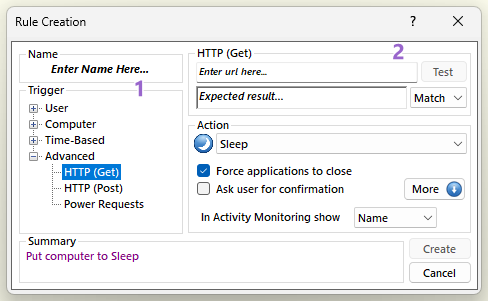
Occurs when the result from the given HTTP (Get) request is matched or is different with the given expected result. This is an AutoStandByPro Plus feature. In order to create a rule using this kind of trigger first select from the "Trigger" section 1 "Advanced" → "HTTP (Get)". Then from section 2 enter in the "Enter url here..." text field the url you wish to check using the format "http://url". When done you can click on the "Test" button to check if the url is valid and update automatically the "Expected result..." text field. Alternative enter in the "Expected result..." text field the result you are expecting from this url. From the drop down menu select either "Match" to indicate that this trigger should activate if the result from the ur is matched with the expected result, or "Differ" to indicate that this trigger should activate if the result from the url is different from the expected result.
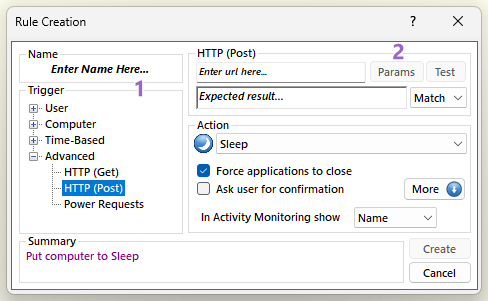
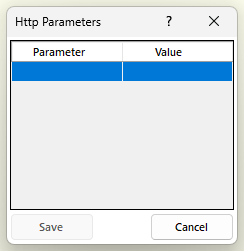
Occurs when the result from the given HTTP (Post) request is matched or is different with the given expected result. This is an AutoStandByPro Plus feature. In order to create a rule using this kind of trigger first select from the "Trigger" section 1 "Advanced" → "HTTP (Post)". Then from section 2 enter in the "Enter url here..." text field the url you wish to check using the format "http://url". Next click on the "Param" button to open the "Http Parameters" window and enter the parameters key pairs <variable name, value> for this http post request. When done you can click on the "Test" button to check if the url is valid and update automatically the "Expected result..." text field. Alternative enter in the "Expected result..." text field the result you are expecting from this url. From the drop down menu select either "Match" to indicate that this trigger should activate if the result from the url is matched with the expected result, or "Differ" to indicate that this trigger should activate if the result from the url is different from the expected result.
 |
 |
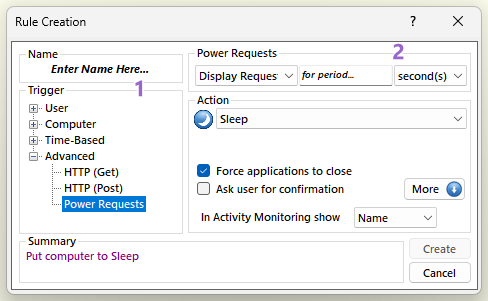
Occurs when there is at least one Power Request (Display, System or Away mode) active. This is an AutoStandByPro Plus feature. In order to create a rule using this kind of trigger first select from the "Trigger" section 1 "Advanced" → "Power Requests". Then from section 2 select from the drop down menu either "Display Request", "System Request" or "Away Mode". In the "for period..." text box enter the period and from the next drop down menu select either "seconds", "minutes", "hours" or "days". This period indicates the period of which the given power request must be active by at least one application before the trigger is activated.